

September 2026
Data-In
Bank outage and degraded status now shown in Flinks Connect When a bank is having an outage or is running degraded, users now see a warning banner as they try to log in, where before they saw nothing. This covers the Key and Regular banks we list on the status page and should cut down on “why can’t I connect?” moments and the tickets that come with them.Enrichment
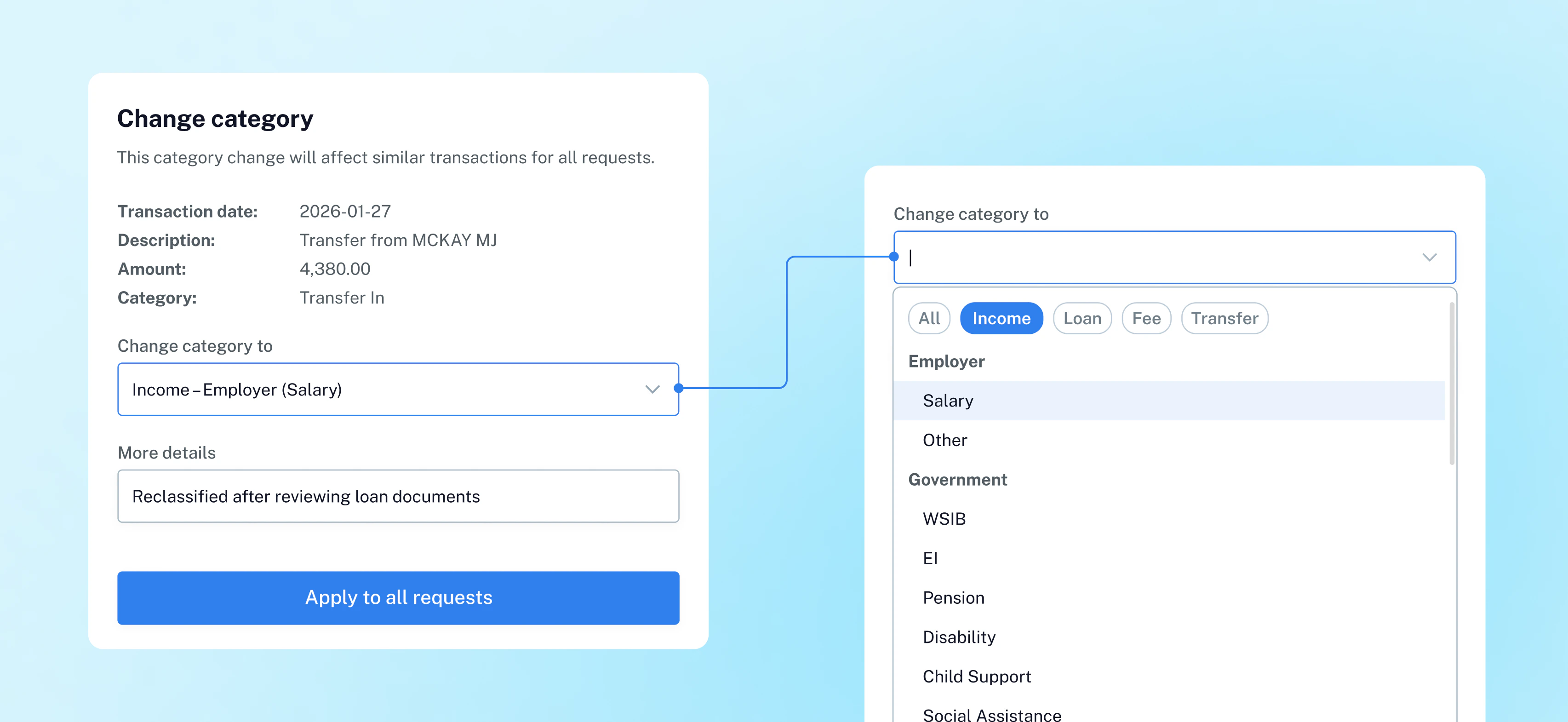
Reversal Transactions Now Categorized Correctly A unified category resolution layer will be deployed to resolve an issue where reversal transactions — including refunds, NSF reversals, and Stop Payment reversals — were categorized incorrectly as income or deposits. The layer combines the Reversal Model and Categorization Model outputs into a single source of truth. The CDB feedback loop has also been updated to accommodate these changes, with the new reversal categories now available for updating a transaction’s category.Payments
Webview support in the payment flow Clients embedding Guaranteed EFT inside a mobile app can now receive the flow’s events (completion, cancellation, and the rest) directly, instead of guessing at what happened by watching the URL.Address is now optional for Guaranteed EFT Clients no longer have to send a payer address when starting a session, so one less thing to collect before a payment can begin.Uploads
Deleting or re-adding files in an existing request now correctly triggers a new data refresh Resolved an issue in the Uploads file management flow where deleting a file or re-adding a previously deleted file from an existing request did not trigger a new processing request. As a result, the analyzed data was not being updated to reflect the file changes. This has been fixed — any file deletion or re-addition now correctly triggers a new request, ensuring the data stays in sync with the current set of uploaded files.August 2026
Flinks Upload
Uploaded files with fraud signals now display correctly on Dashboard: We’ve fixed an issue where uploaded files flagged with fraud signals weren’t loading on the Dashboard, leaving a blank document page. These files now display as expected.Thumbnail previews now load for files with formatting inconsistencies: We’ve fixed an issue where some uploaded files weren’t showing a thumbnail preview on the Dashboard due to a formatting inconsistency. These files are now automatically detected and handled, so previews display correctly for every uploaded file.Dashboard
Standardized date format across all reports: We’ve standardized the date format across every report in the Dashboard. Dates now display consistently, so you can scan and act on your data more easily.July 2026
Flinks Pay
Faster payments for returning customers: Customers who’ve already linked their bank can pay again without re-linking. Flinks can securely save and reuse their bank account information, so repeat payments skip straight to the amount step, offering a smoother checkout experience and helping reduce drop-offs.Payee visibility: Sessions with an optional payee now show those details in the API response, including institutionCode, transitNumber, accountNumber, and accountLabel, so you can clearly see who’s being paid.G-EFT reports by email: G-EFT reports can now be delivered by email on top of the existing SFTP option, and each report includes a summary header row with the aggregate totals. A weekly email schedule is also available alongside the existing daily delivery. To have this enabled, G-EFT customers need to contact their Flinks account managerFlinks Upload
Improved error responses: Error responses from the Flinks Upload complete endpoint now include the LoginId, making it easier to trace and investigate failed requests. Response messages have also been made clearer about the upload state.Duplicate file detection within the same request: Duplicate files submitted within the same upload request, whether matching by name or content, are now caught and rejected upfront.20 MB per-file limit now enforced on the API: The 20 MB per-file size limit already in place for uploads through the Dashboard and Flinks Connect now applies to the Uploads API as well. Files exceeding this limit will be rejected at upload time.Flinks Enrich
Next Pay Date attributes fix: We’ve fixed an issue where Next Pay Date attributes returned no result for some requests, even when pay dates were available.Dashboard
Added Refresh warning: A warning now appears every time before a refresh starts, noting that the refresh may fail if the institution requires reauthentication or is temporarily unavailable. This helps set expectations around the limitations of refresh and its potential impact on the end-user flow. This applies to Flinks Connect requests only. Flinks Upload refreshes are unaffected.June 2026
Flinks Upload
Statement download link now appears for every account: When an uploaded statement includes multiple accounts, only one account previously showed a Download link in the Dashboard. This is now fixed so every account displays its Download link once the upload is processedReliable Tag field in Fraud Analysis and Void Cheque responses: The Tag field is now returned reliably across Fraud Analysis and Void Cheque responses, so you can consistently classify and route results downstreamConsistent user identity across Upload flow: User identity is now consistently returned for the Uploads flow across the Authorize, Get Accounts, Get Statements, and Attributes endpoints, giving you a dependable identifier for tracking and auditing.Mixed-file batches no longer get stuck in progress: We’ve fixed an issue where uploading a large number of mixed batches of PDF and image statements could stall without returning an error. Batches now process through to completion with accurate status updatesixed-file batches no longer get stuck in progress: We’ve fixed an issue where uploading a large number of mixed batches of PDF and image statements could stall without returning an error. Batches now process through to completion with accurate status updates.Clear error when document processing fails: When a document can’t be processed, such as an unreadable void cheque, cached GetAccountsDetail now returns a clear Document_Processing_Failed error instead of a retry-later response, avoiding unnecessary retrieslear error when document processing fails: When a document can’t be processed, such as an unreadable void cheque, cached GetAccountsDetail now returns a clear Document_Processing_Failed error instead of a retry-later response, avoiding unnecessary retries.Clear error when file or size limits are exceeded: Uploads via the API exceeding 24 files or 180 MB in a single session are now blocked with a clear error indicating which limit was hit, instead of silently failing.Complete account data when a statement and void cheque are uploaded together: GetAccountsDetail now correctly merges data from both documents, including institution and transit numbers, for a complete account record.Flinks Pay
EFT V2: We rolled out EFT V2, a unified, session-based flow that replaces the individual endpoints Flinks Pay customers previously had to stitch together. With one session to initiate and a hosted UI component handling account linking, amount entry, and PAD agreement out of the box, integrating EFT now takes days instead of weeks. No custom front-end required.Smoother payment tracking: G-EFT clients now get real-time visibility into payment status. Instead of jumping from started straight to completed, the system now reflects when a user is actively in the payment flow, marking it complete only once finalized. Currently available in the Sandbox environment only.Dashboard
Flinks Pay
EFT V2: We rolled out EFT V2, a unified, session-based flow that replaces the individual endpoints Flinks Pay customers previously had to stitch together. With one session to initiate and a hosted UI component handling account linking, amount entry, and PAD agreement out of the box, integrating EFT now takes days instead of weeks. No custom front-end required.Smoother payment tracking: G-EFT clients now get real-time visibility into payment status. Instead of jumping from started straight to completed, the system now reflects when a user is actively in the payment flow, marking it complete only once finalized. Currently available in the Sandbox environment only.Dashboard
Clearer, more organized NSF insights in the Lending Report: The NSF section of the Lending Report has been redesigned with a dedicated NSFs tab showing total reversed payments by full history and the last 30, 60, and 90 days. Existing tabs (NSF Fees, NSF Overdraft Protection Fees, and Stop Payments) now have updated labels, clearer tooltips, and dollar signs for easier reading.May 2026
Flinks Pay
Multi-account settlement for Interac Request for Money: Flinks Pay customers using Interac Request for Money can now settle funds to different bank accounts on a per-transaction basis, instead of routing all payments to a single account. You can specify the destination account when creating a session, enabling more flexible payout routing based on your workflow or business model. Settlement reports now also reflect the bank account used for each transaction, giving finance teams clearer reconciliation visibility. Available on the V2 API only.Unified cancel endpoint for e-transfer sessions: You can now cancel e-transfer sessions through the V2 API, giving you a single, consistent endpoint to invalidate sessions when users abandon the flow. The existing V1 endpoint remains fully supported.Flinks Enrich
More granular NSF reversal tracking: We’ve added 30, 60, and 90-day lookback windows for count_reversed_payments_because_of_nsf, giving lenders and risk teams more visibility into NSF-related payment reversal patterns. This helps support more informed lending and credit decisions. Available in the Lending package only.Consistent error handling when transaction data is unavailable: The Attributes API now returns standardized error messages when no transaction data is available, making responses easier to interpret and troubleshoot.Flinks Connect
Faster reconnect flows with pre-filled account selection: You can now preserve a user’s previously selected accounts when using the Reconnect feature in Flinks Connect. By passing account IDs through the resumeSelectedAccounts parameter, users can skip the account selection step during reconnect flows, creating a faster and smoother experience. GetAccountsDetail responses are also scoped to the selected accounts onlyField matching accuracy enhancements: We’ve improved how the system handles common address variations in both English and French, including street type abbreviations such as “Blvd.” vs “Boulevard” and “Ave.” vs “Avenue.” French province names such as “Nouvelle-Écosse” and “Nouveau-Brunswick” are also now normalized to their provincial codes, helping improve match consistency and reduce false negatives caused by formatting differencesApril 2026
Flinks Connect
Dark theme support: Flinks Connect now supports a theme parameter, giving you control over how the widget appears in your application. You can choose between light, dark, or system, which automatically adapts to the user’s device settings, helping create a more seamless, consistent experience across your product. The G-EFT flow currently supports light mode only, and bank-hosted OAuth popups are not affected by the theme setting.Pre-fill account selection on Resume: You can now pass previously selected account IDs into a reconnect (Resume) session using the resumeSelectedAccounts parameter. This skips the account selection step and scopes GetAccountsDetail to only those accounts, creating a smoother reconnect experience without requiring users to reselect accounts.Flinks Enrich
Improved detection of NSF-related reversals: Flinks Enrich now captures NSF events based on reversed transactions due to insufficient funds, rather than relying solely on fee-based signals. This provides a more accurate view of account behavior, especially when multiple NSF events occur in a short period. Available via the Flinks Enrich API and in Dashboard reports, including User Analysis and Credit Risk. Reversed payments due to NSF are reflected in the count_reversed_payments_because_of_nsf attribute.Smart Transaction Categorization: Miscellaneous category: We’ve added a new “Miscellaneous” category to support flexible recategorization when no suitable category exists. Transactions can now be reassigned to Miscellaneous Payment or Miscellaneous Deposit, with edit history available for audit.Dark theme support: Flinks Connect now supports a theme parameter, giving you control over how the widget appears in your application. You can choose between light, dark, or system, which automatically adapts to the user’s device settings, helping create a more seamless, consistent experience across your product. The G-EFT flow currently supports light mode only, and bank-hosted OAuth popups are not affected by the theme setting.Pre-fill account selection on Resume: You can now pass previously selected account IDs into a reconnect (Resume) session using the resumeSelectedAccounts parameter. This skips the account selection step and scopes GetAccountsDetail to only those accounts, creating a smoother reconnect experience without requiring users to reselect accounts.Flinks Enrich
Improved detection of NSF-related reversals: Flinks Enrich now captures NSF events based on reversed transactions due to insufficient funds, rather than relying solely on fee-based signals. This provides a more accurate view of account behavior, especially when multiple NSF events occur in a short period. Available via the Flinks Enrich API and in Dashboard reports, including User Analysis and Credit Risk. Reversed payments due to NSF are reflected in the count_reversed_payments_because_of_nsf attribute.Smart Transaction Categorization: Miscellaneous category: We’ve added a new “Miscellaneous” category to support flexible recategorization when no suitable category exists. Transactions can now be reassigned to Miscellaneous Payment or Miscellaneous Deposit, with edit history available for audit.Fixed annual revenue calculation for business attributes: We’ve fixed an issue where the annualized revenue estimate for business customers could return zero. Revenue is now correctly calculated based on operating income, restoring accuracy to business financial insightsFixed employer income calculation for reversals: We’ve fixed an issue where payment reversals were included in employer income deposit calculations. Reversals are now excluded, ensuring accurate deposit totals across employer income sources.Flinks Upload
Improved account number accuracy for void cheques: We’ve fixed an issue where leading zeros in uploaded account numbers could be dropped during processing. Account numbers are now preserved correctly, ensuring more reliable data captureaccount number accuracy for void cheques: We’ve fixed an issue where leading zeros in uploaded account numbers could be dropped during processing. Account numbers are now preserved correctly, ensuring more reliable data capture.Flinks Pay
Balance validation: You can now validate available account balance directly within the G-EFT flow. This ensures transfer amounts do not exceed the account balance or configured limits, helping reduce failed transactionsExpanded risk levels: G-EFT now supports two additional risk levels (low-medium and medium-high), providing more granular risk assessment in guarantee decisionsxpanded risk levels: G-EFT now supports two additional risk levels (low-medium and medium-high), providing more granular risk assessment in guarantee decisions.Same-day settlement for Standard EFT: Standard EFT transactions submitted before the cut-off time can now be processed the same day. This gives you faster access to funds and improves cash flow predictabilitySame-day settlement for Standard EFT: Standard EFT transactions submitted before the cut-off time can now be processed the same day. This gives you faster access to funds and improves cash flow predictability.March 2026
Flinks Enrich
Flinks Upload
Improved upload tag consistency with Fraud Analysis API: We identified an issue in certain scenarios where tags applied during file uploads were not preserved after Fraud Analysis API processing. We’ve deployed a fix to address this and improve tag consistency across workflows.Flinks Pay
User-friendly G-EFT error messages: G-EFT now displays clearer, more user-friendly error messages for identity verification failures and account eligibility issues. All messages are available in both English and French for a consistent bilingual experience.Enhanced failure insights via JS events: The existing GUARANTEE_FAILED event now includes a detailed failure reason, distinguishing between IDENTITY_MISMATCH and ACCOUNT_NOT_ELIGIBLE. This gives you better visibility into why a transaction failed.Available balance validation: Users can now only submit amounts up to their available account balance. The interface displays the maximum allowable amount and prevents over-limit entries, helping reduce the risk of NSF.
Flinks Upload
Improved upload tag consistency with Fraud Analysis API: We identified an issue in certain scenarios where tags applied during file uploads were not preserved after Fraud Analysis API processing. We’ve deployed a fix to address this and improve tag consistency across workflows.Flinks Pay
User-friendly G-EFT error messages: G-EFT now displays clearer, more user-friendly error messages for identity verification failures and account eligibility issues. All messages are available in both English and French for a consistent bilingual experience.Enhanced failure insights via JS events: The existing GUARANTEE_FAILED event now includes a detailed failure reason, distinguishing between IDENTITY_MISMATCH and ACCOUNT_NOT_ELIGIBLE. This gives you better visibility into why a transaction failed.Available balance validation: Users can now only submit amounts up to their available account balance. The interface displays the maximum allowable amount and prevents over-limit entries, helping reduce the risk of NSF.February 2026
Flinks Connect
- FieldMatch accuracy enhancements: We’ve made improvements to the FieldMatch API endpoint to deliver more accurate and reliable match results in edge cases. Enhancements include improved middle name and initial detection (e.g., John J Smith vs. John Jesson Smith), better handling of special characters and accents (e.g., Junior vs. Júnior), and improved matching when address details are incomplete or partially provided (such as missing unit numbers or coach house designations). These updates will help reduce false negatives and increase match confidence
- FieldMatch accuracy enhancements: We’ve made improvements to the FieldMatch API endpoint to deliver more accurate and reliable match results in edge cases. Enhancements include improved middle name and initial detection (e.g., John J Smith vs. John Jesson Smith), better handling of special characters and accents (e.g., Junior vs. Júnior), and improved matching when address details are incomplete or partially provided (such as missing unit numbers or coach house designations). These updates will help reduce false negatives and increase match confidence.
Flinks Enrich
- Business & Personal categorization improvements: We’ve enhanced categorization for Business and Personal Attributes, including improved detection of deposit patterns, cash advance patterns, and expanded micro-lender recognition. Click here to explore our attribute packages.
Flinks Enrich
- Business & Personal categorization improvements: We’ve enhanced categorization for Business and Personal Attributes, including improved detection of deposit patterns, cash advance patterns, and expanded micro-lender recognition. Click here to explore our attribute packages.
January 2026
Flinks Pay
- You can now receive a Next Best Offer (NBO) even when you specify an amount when creating a G-EFT session. As long as the NBO amount falls within your configured minimum and maximum limits, the offer will be generated. If it falls outside those limits, the session is marked as failed and the guarantee is refused, unchanged from previous behaviorreceive a Next Best Offer (NBO) even when you specify an amount when creating a G-EFT session. As long as the NBO amount falls within your configured minimum and maximum limits, the offer will be generated. If it falls outside those limits, the session is marked as failed and the guarantee is refused, unchanged from previous behavior.
- CAD is now specified as the default currency across the G-EFT flow, including the Enter Amount, Review your deposit details, and Next Best Offer screens.
- CAD is now specified as the default currency across the G-EFT flow, including the Enter Amount, Review your deposit details, and Next Best Offer screens.
December 2025
Flinks Pay
- You can now control whether the To account section appears on the deposit screen and customize the label shown during the G-EFT deposit flow. This gives you more flexibility to tailor the experience to your product and user journey.
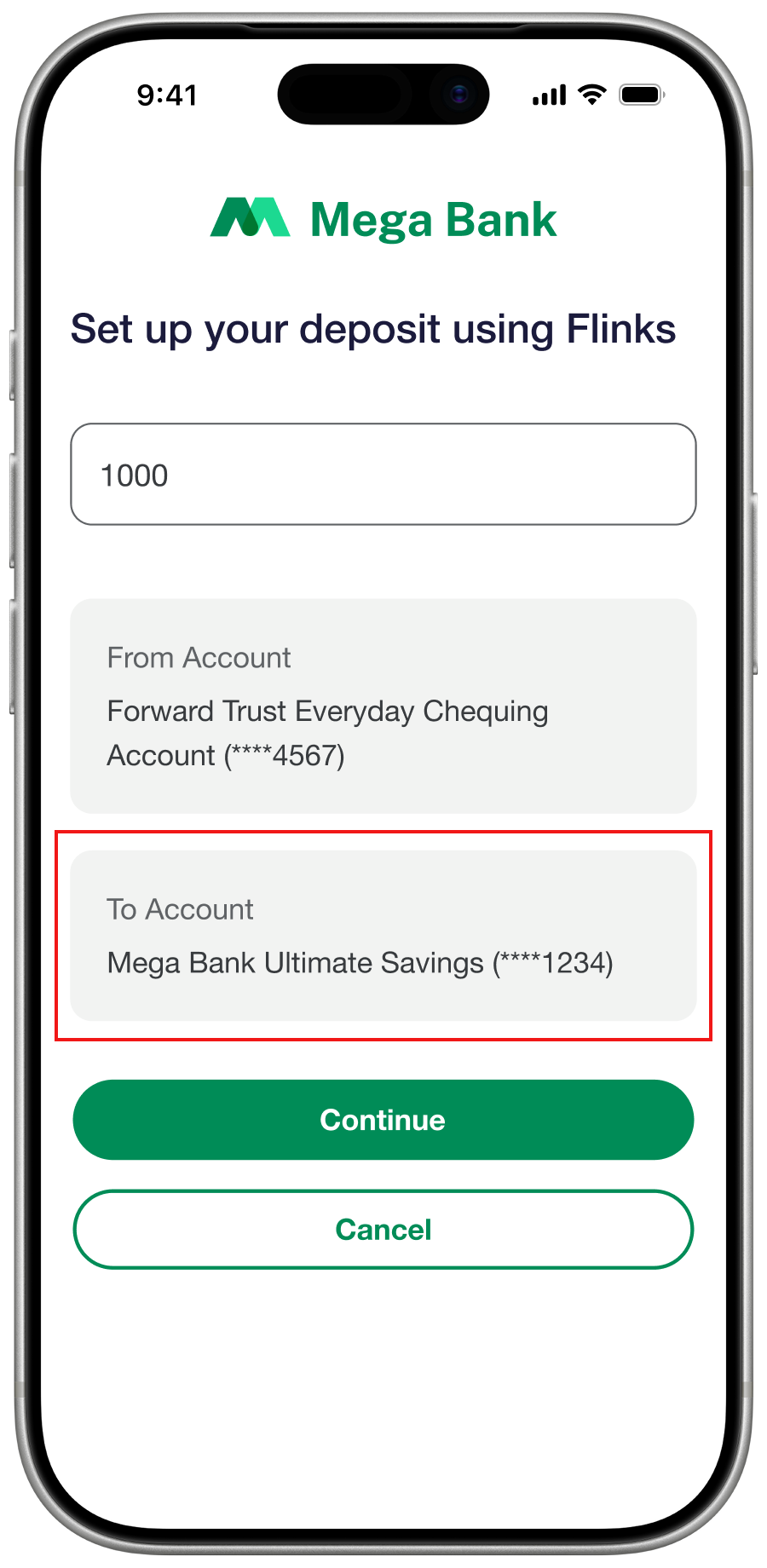
- You can now control whether the To account section appears on the deposit screen and customize the label shown during the G-EFT deposit flow. This gives you more flexibility to tailor the experience to your product and user journey.
Flinks Upload
- You can now use the Refresh button in the Dashboard to run fraud checks on previously unprocessed files. This applies to files uploaded during periods when fraud analysis was unavailable. When fraud results are missing, Flinks Upload completes the analysis and updates the risk verdict. This capability applies to unprocessed files up to 90 days oldYou can now use the Refresh button in the Dashboard to run fraud checks on previously unprocessed files. This applies to files uploaded during periods when fraud analysis was unavailable. When fraud results are missing, Flinks Upload completes the analysis and updates the risk verdict. This capability applies to unprocessed files up to 90 days old.
- We now factor the Unreconciled Balance signal into fraud verdicts. When present, files previously marked Normal or Trusted are updated to Warning, while Warning and High Risk verdicts remain unchanged. The updated verdict appears on the file page, checklist, and Overview tab.
- We now factor the Unreconciled Balance signal into fraud verdicts. When present, files previously marked Normal or Trusted are updated to Warning, while Warning and High Risk verdicts remain unchanged. The updated verdict appears on the file page, checklist, and Overview tab.
November 2025
Flinks Paylinks Pay
We’ve introduced several enhancements to Guaranteed EFT (G-EFT):We’ve introduced several enhancements to Guaranteed EFT (G-EFT):- You can now explicitly accept or reject a payment guarantee before completing a G-EFT session. A new webhook notifies you when a guarantee is issued, and full guarantee details are available so you can automate or manually review approvals. You can also configure auto-acceptance for low-risk guaranteesYou can now explicitly accept or reject a payment guarantee before completing a G-EFT session. A new webhook notifies you when a guarantee is issued, and full guarantee details are available so you can automate or manually review approvals. You can also configure auto-acceptance for low-risk guarantees.
- You can now disable the default Flinks consent screen and use your own, enabling a fully branded consent experience while keeping configuration centralized.
- You can now enable or disable Next Best Offer. When turned off, users proceed only with the amount you or they specify, giving you tighter control over eligibility and user flows.
- A new webhook notifies you when a G-EFT session moves to failed, cancelled, or completed status. This gives you real-time insight into why a session didn’t complete or where a user exited the flow.
- You can now direct funds either to your organization’s settlement account or to individual user accounts, offering more flexibility based on your use case.
- A new endpoint returns complete payor account details, including institution code, transit number, account number, and account label.
- You can now disable the default Flinks consent screen and use your own, enabling a fully branded consent experience while keeping configuration centralized.
- You can now enable or disable Next Best Offer. When turned off, users proceed only with the amount you or they specify, giving you tighter control over eligibility and user flows.
- A new webhook notifies you when a G-EFT session moves to failed, cancelled, or completed status. This gives you real-time insight into why a session didn’t complete or where a user exited the flow.
- You can now direct funds either to your organization’s settlement account or to individual user accounts, offering more flexibility based on your use case.
- A new endpoint returns complete payor account details, including institution code, transit number, account number, and account label.
Flinks UploadUpload
- Files added to an existing request through File Management are now analyzed by our Fraud API. Fraud signals appear directly under each document link in the Document Check tab, and they now contribute to the final verdict shown in the Overview tabFiles added to an existing request through File Management are now analyzed by our Fraud API. Fraud signals appear directly under each document link in the Document Check tab, and they now contribute to the final verdict shown in the Overview tab.
October 2025
Featured Updateeatured Update
- We’ve completely revamped our documentation site. Explore the fresh design, streamlined navigation, faster and more accurate search, and overall smoother experience to help you find what you need fastercompletely revamped our documentation site. Explore the fresh design, streamlined navigation, faster and more accurate search, and overall smoother experience to help you find what you need faster.
Flinks APIAPI
- We’ve added a new multi-factor authentication (MFA) request option for clients who are using Trusted Device Verification MFA as part of a Legacy API integration. If a user doesn’t receive the MFA push notification on their device, you can now trigger an additional API call to re-prompt the notificationadded a new multi-factor authentication (MFA) request option for clients who are using Trusted Device Verification MFA as part of a Legacy API integration. If a user doesn’t receive the MFA push notification on their device, you can now trigger an additional API call to re-prompt the notification.
September 2025
Flinks Connect
- We’ve added a JavaScript event that is triggered when an authorization token is expired or invalid, allowing clients to automatically restart the authentication flow and provide a smoother user experienceadded a JavaScript event that is triggered when an authorization token is expired or invalid, allowing clients to automatically restart the authentication flow and provide a smoother user experience.
- We’ve updated some Flinks connect animationsupdated some Flinks connect animations.
- We’ve made file management smarter and more flexible: you can now update existing upload requests and resend upload links tied to the same login, so collecting updated documents is faster, smoother, and keeps every user’s record perfectly organized.
- We’ve made file management smarter and more flexible: you can now update existing upload requests and resend upload links tied to the same login, so collecting updated documents is faster, smoother, and keeps every user’s record perfectly organized.
Flinks OutboundOutbound
- We’ve introduced a new api/v2/providers Outbound API endpoint to enable Data Recipients to retrieve detailed Data Provider insights without using Flinks Connect, including filtering options and comprehensive provider metadata’ve introduced a new api/v2/providers Outbound API endpoint to enable Data Recipients to retrieve detailed Data Provider insights without using Flinks Connect, including filtering options and comprehensive provider metadata.
August 2025
Flinks ConnectConnect
- We’ve made some improvements to the Flinks Connect flow, particularly when resuming an expired session’ve made some improvements to the Flinks Connect flow, particularly when resuming an expired session.
- We’ve also improved session tracking. Clients can now set up a JavaScript event to track by session and user ID.
- We’ve also improved session tracking. Clients can now set up a JavaScript event to track by session and user ID.
Flinks PayPay
- We launched a new webhook system to clients who are using Interac E-Transfer as their payment method in Flinks Pay. When enabled, this webhook will send events when a transaction status has changed launched a new webhook system to clients who are using Interac E-Transfer as their payment method in Flinks Pay. When enabled, this webhook will send events when a transaction status has changed.
July 2025
Flinks UploadUpload
- We now support a new document type in Flinks Upload: void cheques. Clients can now upload and process void cheques in addition to other bank statements. To enable this feature in Flinks Connect, see Upload Bank Statements now support a new document type in Flinks Upload: void cheques. Clients can now upload and process void cheques in addition to other bank statements. To enable this feature in Flinks Connect, see Upload Bank Statements.
Flinks EnrichEnrich
- We’ve released new categorization models to a select group of clients for testing purposes. This update will allow us to process twice as many transactions per account, and will be made more widely-available at a later dat’ve released new categorization models to a select group of clients for testing purposes. This update will allow us to process twice as many transactions per account, and will be made more widely-available at a later date.
June 2025
Flinks ConnectConnect
- We’ve added a new optional text field in the footer of the credentials page, allowing you to further customize the Flinks Connect experience’ve added a new optional text field in the footer of the credentials page, allowing you to further customize the Flinks Connect experience.
- We’ve updated Flinks Connect by adding a new card scanner and the ability to show customer logos on the Consent Screen. We’ve also released design updates that are available to select clients. To learn more about these updates or to enable these improvements in your integration, contact your Flinks Representative.
- Upload no longer requires customers to select a financial institution when they’re uploading a file. However, we’ll still group it under the correct financial institution after processing the data.
- We’ve updated Flinks Connect by adding a new card scanner and the ability to show customer logos on the Consent Screen. We’ve also released design updates that are available to select clients. To learn more about these updates or to enable these improvements in your integration, contact your Flinks Representative.
- Upload no longer requires customers to select a financial institution when they’re uploading a file. However, we’ll still group it under the correct financial institution after processing the data.
Flinks APIFlinks API
- We’ve released updates to our API that has improved the accuracy of the Field Matching Service’ve released updates to our API that has improved the accuracy of the Field Matching Service.
May 2025
Flinks PayPay
- We’ve expanded the number of financial institutions we support. Customers can now receive an instant e-transfer payment from 223 financial institutions across Canadaexpanded the number of financial institutions we support. Customers can now receive an instant e-transfer payment from 223 financial institutions across Canada.
Bug Fixes
- We’ve completed a bug-fixing blitz that improved quality and functionality to several Flinks products, including Dashboard, Enrichment, and Upload (document processing).
Bug Fixes
- We’ve completed a bug-fixing blitz that improved quality and functionality to several Flinks products, including Dashboard, Enrichment, and Upload (document processing).
April 2025
Flinks OutboundOutbound
- We’ve added more than 3,000 new financial US institutionsmore than 3,000 new financial US institutions.
March 2025
Flinks APIAPI
- We’ve added two new parameters to the
/FieldMatchendpoint:emailandphone. You can now use these parameters to help you confirm a customer’s identity or account ownershipadded two new parameters to the/FieldMatchendpoint:emailandphone. You can now use these parameters to help you confirm a customer’s identity or account ownership.
February 2025
Flinks Connect
- We’ve released design updates to the error screens in Flinks Connect. To see these new screens, review our Flinks Connect widgeterror screens in Flinks Connect. To see these new screens, review our Flinks Connect widget.
January 2025
Flinks Connectlinks Connect
- We’ve released design updates to the Consent Screen in Flinks Connect. Clients can now customize this screen by adding their company logo. For more information, see Flinks Connect Parameters - Customise Your Integration or contact your Flinks Representative.e’ve released design updates to the Consent Screen in Flinks Connect. Clients can now customize this screen by adding their company logo. For more information, see Flinks Connect Parameters - Customise Your Integration or contact your Flinks Representative.
December 2024
Featured Updateeatured Update
- Watch our Changelog Wrapped video to learn more about the exciting releases that happened in 2024:Watch our Changelog Wrapped video to learn more about the exciting releases that happened in 2024:
Flinks Connect
- We’ve released updates to improve accessibility and design, including an updated colour palette, links, form elements and more.
Flinks Connect
- We’ve released updates to improve accessibility and design, including an updated colour palette, links, form elements and more.
November 2024
Flinks API
- You can now receive additional KYC and KYB data from the
/GetAccountsDetailendpoint when an end-user has successfully connected their account(s). This update compliments our release for Flinks API. Use this data to verify the identity of the end-userYou can now receive additional KYC and KYB data from the/GetAccountsDetailendpoint when an end-user has successfully connected their account(s). This update compliments our release for Flinks API. Use this data to verify the identity of the end-user. - For personal accounts, you can now receive the Account Holder Name and Address in the request to improve KYCFor personal accounts, you can now receive the Account Holder Name and Address in the request to improve KYC.
- For business accounts, you’ll be able to receive the
BusinessName andBusinessAddress to improve KYB. - For business accounts, you’ll be able to receive the
BusinessName andBusinessAddress to improve KYB.
Flinks Connect
- We’ve updated the wording on the Consentupdated the wording on the Consent Screen.
- We’ve released design updates to the MFA (multi-factor authentication) screens. To learn more about these changes, watch the following video to the MFA (multi-factor authentication) screens. To learn more about these changes, watch the following video
October 2024
Flinks APIlinks API
- We’ve added new information to the
/GetAccountsDetailand the/GetAccountsSummaryendpoints that makes it easier for you to verify the identity of your end-users. Both endpoints now return aPersonalorBusinesslabel in theAccountTypefield. This update does not affect Dashboard.added new information to the/GetAccountsDetailand the/GetAccountsSummaryendpoints that makes it easier for you to verify the identity of your end-users. Both endpoints now return aPersonalorBusinesslabel in theAccountTypefield. This update does not affect Dashboard. - We’ve added an extra layer of security to the authentication process. Clients are now required to include a mandatory authorize token when they’re authenticating, either in the Flinks Connect URL or using the
/Authorizeendpoint. If you are not already passing one, see Authorize Token to learn how to include this in your integration.added an extra layer of security to the authentication process. Clients are now required to include a mandatory authorize token when they’re authenticating, either in the Flinks Connect URL or using the/Authorizeendpoint. If you are not already passing one, see Authorize Token to learn how to include this in your integration.
Flinks Connect
- We’ve added an auto-fill password guide to the Login Screen.
- We’ve released design updates, including new screens for Flinks Upload. Watch the video below to see these new screens in action:
Flinks Connect
- We’ve added an auto-fill password guide to the Login Screen.
- We’ve released design updates, including new screens for Flinks Upload. Watch the video below to see these new screens in action:
September 2024
Featured Updateeatured Update
- We’ve released significant updates to our Flinks Connect product, including:We’ve released significant updates to our Flinks Connect product, including:
- New, modern UI screens
- Increased transparency around our data security protocols
- Improved core functionality including faster loading speeds, and more
- New, modern UI screens
- Increased transparency around our data security protocols
- Improved core functionality including faster loading speeds, and more
- We’ve focused on making the account connection process as fast and as simple as possible. To learn more about these changes and why we made them, check out our blog post. To see these new screens in action, play around with our Flinks Connect Widget or watch the changes walkthrough video below:
- We’ve focused on making the account connection process as fast and as simple as possible. To learn more about these changes and why we made them, check out our blog post. To see these new screens in action, play around with our Flinks Connect Widget or watch the changes walkthrough video below:
Coming SoonComing Soon
- A new direct oAuth connection will be available later next month. We currently offer direct oAuth connections with 8 of the top 10 US banks, including: new direct oAuth connection will be available later next month. We currently offer direct oAuth connections with 8 of the top 10 US banks, including:
- Chase Bank
- Bank of America
- Wells Fargo
- Citibank
- U.S. Bank
- PNC Capital
- Capital One
- TD
- Chase Bank
- Bank of America
- Wells Fargo
- Citibank
- U.S. Bank
- PNC Capital
- Capital One
- TD
- We’re expecting to add a direct oAuth connection to Truist in October 2024, and will support 9 of the top 10 US banks. Stay tuned for more updatesWe’re expecting to add a direct oAuth connection to Truist in October 2024, and will support 9 of the top 10 US banks. Stay tuned for more updates.
August 2024
Flinks API
- Released support for asynchronous authentication. You can now call the
/Authorizeendpoint and authenticate an end-user at the same time as you’re performing other tasks.upport for asynchronous authentication. You can now call the/Authorizeendpoint and authenticate an end-user at the same time as you’re performing other tasks.
Flinks Connect
- Added a new Flinks Connect customization parameter,
consentTitleAppendedText, that allows you to update the title on the Consent pagAdded a new Flinks Connect customization parameter,consentTitleAppendedText, that allows you to update the title on the Consent page. - Released design updates, including a new Institution Selection page. For more information or to enable these updates in your Flinks Connect integration, contact your Flinks Representative.
- Released design updates, including a new Institution Selection page. For more information or to enable these updates in your Flinks Connect integration, contact your Flinks Representative.
July 2024
Flinks API
- Released several performance-related updates:Released several performance-related updates:
- Increased the speed of API calls
- Enhanced troubleshooting abilities
- Improved overall performance
- Increased the speed of API calls
- Enhanced troubleshooting abilities
- Improved overall performance
- Optimized the
/DeleteCardendpoint by reducing potential errors and decreased the amount of time it takes to delete a card. - Optimized the
/DeleteCardendpoint by reducing potential errors and decreased the amount of time it takes to delete a card.
Flinks Connect
- Released design updates to select clients. To learn more about these updates or to enable them in your integration, contact your Flinks RepresentativeReleased design updates to select clients. To learn more about these updates or to enable them in your integration, contact your Flinks Representative.
June 2024
Flinks API
- Minor improvements.
Flinks Connect
- Added a card scanner to the account connection flowAdded a card scanner to the account connection flow.
- Customers can now add their logo to the Consent pageCustomers can now add their logo to the Consent page.
- Released design updates to select clients. To learn more or to enable these improvements in your integration, contact your Flinks RepresentativeReleased design updates to select clients. To learn more or to enable these improvements in your integration, contact your Flinks Representative.
- Upload no longer requires customers to select a financial institution when they’re uploading a file. However, we’ll still group it under the correct financial institution after processing the data.
- Upload no longer requires customers to select a financial institution when they’re uploading a file. However, we’ll still group it under the correct financial institution after processing the data.
May 2024
Flinks API
- Minor improvements.
Flinks Connect
- Released a new feature that allows you to show/hide a password.
- Updated the security information on the Consent and Credentials pages.
- Released a new feature that allows you to show/hide a password.
- Updated the security information on the Consent and Credentials pages.
- Minor improvements.
March 2024
Flinks API
- Wealth Authentication and API rendering refactor.
- Wealth Authentication and API rendering refactor.
- Minor improvements.
Flinks Connect
- Minor improvements.
December 2023
Flinks API
- Minor improvements.
Flinks Upload
- You can now upload images in our Bank Statement Upload product. For support or questions, reach out to help@flinks.com.
Flinks Upload
- You can now upload images in our Bank Statement Upload product. For support or questions, reach out to help@flinks.com.
Flinks Connect
- Minor improvements.
November 2023
Flinks API
- Minor improvements.
Flinks ConnectConnect
- Minor improvementsMinor improvements.
October 2023
Flinks API
- Minor improvements.
Flinks UploadUpload
- We’re excited to announce that our Bank Statement Upload product now also supports Void Cheque uploads. This new feature provides an additional way to verify your account securely and efficiently. The feature can be used as a standalone solution or as a fallback to financial data aggregation. For support or questions, reach out to help@flinks.comWe’re excited to announce that our Bank Statement Upload product now also supports Void Cheque uploads. This new feature provides an additional way to verify your account securely and efficiently. The feature can be used as a standalone solution or as a fallback to financial data aggregation. For support or questions, reach out to help@flinks.com.
September 2023
Flinks API
- Minor improvements.
Flinks Connect
- New consent management screen within Flinks Connect solution to give your customers better transparency into what data is being shared and how it’s being used, allowing them to better understand their data rights. To learn more about the consent update and configuration, head over to our documentation.
- New consent management screen within Flinks Connect solution to give your customers better transparency into what data is being shared and how it’s being used, allowing them to better understand their data rights. To learn more about the consent update and configuration, head over to our documentation.
- Minor improvements.
August 2023
Flinks API
- Fraud Detection Flags for uploaded statements are now available via the API. This enables clients that use the new PDF Upload feature to check statements for discrepancies and tampering automatically and receive that insight via a new API.
- Improvements to legacy integration using only API (not Flinks connect).
- Minor improvements.
Flinks Connect
- Fraud Detection Flags for uploaded statements are now available via the API. This enables clients that use the new PDF Upload feature to check statements for discrepancies and tampering automatically and receive that insight via a new API.
- Improvements to legacy integration using only API (not Flinks connect).
- Minor improvements.
Flinks Connect
- Minor improvements.
June 2023
Flinks API
- Added a new API endpoint for Payment Optimizations,
/PrePayment. This is a new API that enables our clients to set optimal payment dates, amounts and better understand the success chances associated with recurring paymentAdded a new API endpoint for Payment Optimizations,/PrePayment. This is a new API that enables our clients to set optimal payment dates, amounts and better understand the success chances associated with recurring payments. - Minor improvements.
Flinks Connect
- PDF Statements Upload:
- Added flows within Flinks Connect and our Dashboard to allow a fast, seamless upload of PDF Statements as an alternative/fallback to typical bank linking aggregation.
- Added the ability to return PDF data in Flinks standard formats (Dashboard, existing data return API’s).
- Also improved the speed, quality and reliability of PDF statements analysis and return.
- Finally, we have expanded coverage to all institutions in Canada and the US.
- Flinks Payroll Verification beta: This is a new API product, seamlessly embedded in Flinks Connect, offering direct connectivity to customers’ payroll platforms for comprehensive income and employment verification, including those of gig workers.
- PDF Statements Upload:
- Added flows within Flinks Connect and our Dashboard to allow a fast, seamless upload of PDF Statements as an alternative/fallback to typical bank linking aggregation.
- Added the ability to return PDF data in Flinks standard formats (Dashboard, existing data return API’s).
- Also improved the speed, quality and reliability of PDF statements analysis and return.
- Finally, we have expanded coverage to all institutions in Canada and the US.
- Flinks Payroll Verification beta: This is a new API product, seamlessly embedded in Flinks Connect, offering direct connectivity to customers’ payroll platforms for comprehensive income and employment verification, including those of gig workers.
- Minor improvements.
May 2023
Flinks API
- Improved Categorization Models.
- Improved Categorization Models.
- Minor improvements.
Flinks Connect
- Minor improvements.
Dashboard
- Added Segment: an extended reporting feature of Enrichment to deliver actionable insights from your customer segmentation and improve your underwriting performance at scale.
Dashboard
- Added Segment: an extended reporting feature of Enrichment to deliver actionable insights from your customer segmentation and improve your underwriting performance at scale.
March 2023
Flinks API
- Minor improvements.
Flinks Connect
- Minor improvements.
Dashboard
- Added Attributes Builder UI to facilitate the creation of ‘Custom’ Attributes for specific needs.
Dashboard
- Added Attributes Builder UI to facilitate the creation of ‘Custom’ Attributes for specific needs.
January 2023
Flinks API
- Minor improvements.
Flinks Connect
- Minor improvements.
Dashboard
- Added a feature that will allow the user to adjust transactions categories on the Attributes reports in the CDB.
Flinks Connect
- Minor improvements.
Dashboard
- Added a feature that will allow the user to adjust transactions categories on the Attributes reports in the CDB.
October 2022
Flinks API
- Minor improvements.
Flinks Connect
- Accessibility improvementsAccessibility improvements.
September 2022
Flinks API
- Added
InstituionIdfield to the API resultsAddedInstituionIdfield to the API results. - Updated Canada Entity Recognition Model to v66.
- Minor improvements.
Flinks ConnectFlinks Connect
- Improved the retry options when getting an error with
accountSelectorEnableparameterImproved the retry options when getting an error withaccountSelectorEnableparameter. - Minor improvements.
- Minor improvements.
August 2022
Flinks API
- Updated Canada Entity Recognition Model to v4Entity Recognition Model to v4.
- Updated Canada Entity Recognition Model to v55.
- Updated USA Categorization model Model to v13.
- Updated USA Categorization model Model to v13.
- Minor improvements.
Dashboard
- Added a new page for institution status.
Dashboard
- Added a new page for institution status.
June 2022
Flinks API
- Updated Canada Broad Categorization Model to v99.
- Updated Canada Broad Categorization Model to v10Updated Canada Broad Categorization Model to v10.
- Minor improvements.
DashboardDashboard
- Reorganized the History tab under each Request and added additional headers to Request InfoReorganized the History tab under each Request and added additional headers to Request Info.
May 2022
Flinks API
- Updated Canada Broad Categorization Model to v8dated Canada Broad Categorization Model to v8.
- Improved Categorization Models.
- Minor improvements.
Flinks Connect
- Added the
preventAutoFocusandpreventAutoFillparameters that can be used to disable form focusing and auto-completionthepreventAutoFocusandpreventAutoFillparameters that can be used to disable form focusing and auto-completion. - Minor improvements.
- Minor improvements.
April 2022
Flinks API
- Upgraded the entity recognition model from v1.0 to ventity recognition model from v1.0 to v2.0.
- Improved Categorization ModelsImproved Categorization Models.
- Minor improvements.
Flinks ConnectConnect
- Added parameters
termsTextPreLink,termsTextLinkandtermsTextPostLinkto personalize the termsUrlAdded parameterstermsTextPreLink,termsTextLinkandtermsTextPostLinkto personalize the termsUrl.
March 2022
Flinks API
- Upgraded the US Broad Categorization Model from v11.0 to v12.0.
- Upgraded the CA Broad Categorization Model from v2.0 to v3.0.
- Updated Canada Broad Categorization Model to V4.
- Upgraded the US Broad Categorization Model from v11.0 to v12.0.
- Upgraded the CA Broad Categorization Model from v2.0 to v3.0.
- Updated Canada Broad Categorization Model to V4.
- Minor improvements.
Flinks Enrich
- New Attributes released to detect and separate bonus and extra income from payroll sourcAttributes released to detect and separate bonus and extra income from payroll sources.
Dashboard
- Added Save feature for External Data requests.
- Added the option to assign Requests to Teammates.
Dashboard
- Added Save feature for External Data requests.
- Added the option to assign Requests to Teammates.
February 2022
Flinks API
- Minor improvements.
Flinks EnrichEnrich
- New Life Events attributeNew Life Events attributes.
- New Next 2 Paydates attributes.
- Updated Gross Income Attributes to now use updated tax tables for 2021/22.
- New Next 2 Paydates attributes.
- Updated Gross Income Attributes to now use updated tax tables for 2021/22.
January 2022
Flinks API
- Upgraded the US Broad Categorization Model from v10.0 to v1110.0 to v11.0.
- Minor improvements.
Flinks Connect
- Accessibility improvements.
Flinks Connect
- Accessibility improvements.
December 2021
Flinks API
- Upgraded the US Broad Categorization Model from v9.0 to v10graded the US Broad Categorization Model from v9.0 to v10.0.
- Minor improvements.
November 2021
Flinks API
- Updated Broad Categorization Model from v8.0 to v9dated Broad Categorization Model from v8.0 to v9.0.
- Minor improvements.
Flinks Enrich
- Added Custom Attributes Creation.
Dashboard
- Added new
BusinessAnalysis Report.
Flinks Enrich
- Added Custom Attributes Creation.
Dashboard
- Added new
BusinessAnalysis Report.
October 2021
Flinks API
- Upgraded broad categorization from v6.0 to v76.0 to v7.0.
- Created gross income estimation model v1Created gross income estimation model v1.0.
- Added the ability of searching by Tag in the Portalthe ability of searching by Tag in the Portal.
- Updated US Broad Categorization Model from v7.0 to V8Updated US Broad Categorization Model from v7.0 to V8.0.
- Updated CA Categorization Model from v13 to v14.
- Updated CA Categorization Model from v13 to v14.
- Minor improvements.
September 2021
Flinks API
- Upgraded broad categorization from v4.0 to v54.0 to v5.0.
- Upgraded broad categorization from v5.0 to v6.0Upgraded broad categorization from v5.0 to v6.0.
- Added new category predictions and improved general performance.
- Created entity recognition model v1.0.
- Added new category predictions and improved general performance.
- Created entity recognition model v1.0.
- Minor improvements.
August 2021
Flinks API
- Upgraded broad categorization from v3.0 to v4.0Upgraded broad categorization from v3.0 to v4.0.
- Added new category predictions and improved general performancAdded new category predictions and improved general performance.
- Minor improvements.
July 2021
Flinks API
- New endpoint for routing number institution search,
/Institutions/RoutingNumber/New endpoint for routing number institution search,/Institutions/RoutingNumber/. - New US Institutions coverage: Discover Bank and ChimeNew US Institutions coverage: Discover Bank and Chime.
- Return routing numbers for US Institutions on the endpoint
/IReturn routing numbers for US Institutions on the endpoint /Institutions. - New endpoint to retrieve transfer history by date range for Flinkspay.
- New endpoint to retrieve transfer history by date range for Flinkspay.
- Minor improvements.
Flinks Connect
- Modified the default landing pageModified the default landing page.
- Added two new parameters to customize the landing pageAdded two new parameters to customize the landing page.
Flinks EnrichFlinks Enrich
- Improved Categorization Models for AttributesImproved Categorization Models for Attributes.
- Added Attributes Use-Case focused on Lending.
- Added Attributes Use-Case focused on Lending.
Dashboard
- Added the option to delete a request from the main request feed.
- Minor improvements on team management.
Dashboard
- Added the option to delete a request from the main request feed.
- Minor improvements on team management.
June 2021
Flinks API
- Improved US US Categorization Models.
- Allowed refreshes for extended coverage institutions.
- Added institution ID for extended coverage institutions.
- Allowed refreshes for extended coverage institutions.
- Added institution ID for extended coverage institutions.
- Minor improvements.
Flinks ConnectFlinks Connect
- Phased out react version 2Phased out react version 2.
- New dashboard onboarding flowdashboard onboarding flow.
- Updated MFA credentials flow when logged inUpdated MFA credentials flow when logged in.
Dashboard
- Added the parameter tag to the CSV export.
Dashboard
- Added the parameter tag to the CSV export.
May 2021
Flinks API
- Improved Categorization Models.
- Minor improvements.
Dashboard
- Sample data added to the sandbox request feedSample data added to the sandbox request feed.
- New status to the requestsNew status to the requests.
- Filter requests by date, financial institution or status.
- Team members can assign request to themselves or see who a request is assigned to.
- Allow users to approve or deny requests.
- Filter requests by date, financial institution or status.
- Team members can assign request to themselves or see who a request is assigned to.
- Allow users to approve or deny requests.
April 2021
Flinks API
- Improved Categorization Models.
- Minor improvements.
DashboardDashboard
- Improved UX for the team administration capabilitiesImproved UX for the team administration capabilities.
- Added an option to export data to CSV.
- Added an option to export data to CSV.
Documentation Portal
- Enabled Flinks Connect version 2 in the documentationEnabled Flinks Connect version 2 in the documentation configurator.
March 2021
Flinks API
- Improved Categorization ModelImproved Categorization Models.
- Added New Endpoint to view Investments Refresh Status,
/GetWealthNightlyRefreshStatusAdded New Endpoint to view Investments Refresh Status,/GetWealthNightlyRefreshStatus. - Minor improvements.
Flinks Connect
- Added Investments Data.
Documentation Portal
- Added New iFrame configurator.
- Added search option to Borrower link.
Flinks Connect
- Added Investments Data.
Documentation Portal
- Added New iFrame configurator.
- Added search option to Borrower link.
February 2021
Flinks API
- Enabled Flinks Connect Account Selection in US Connections.
- Improved Categorization Models for US and Canada.
- Enabled Flinks Connect Account Selection in US Connections.
- Improved Categorization Models for US and Canada.
- Minor improvements.
January 2021
Flinks API
- Minor improvements.
Flinks Connect
- Minor improvements.
Flinks Connect
- Minor improvements.
December 2020
Flinks API
- Speed improvements on the
/AuthorizeendpointSpeed improvements on the/Authorizeendpoint. - Added new Attributes to our growing Attributes LibraryAdded new Attributes to our growing Attributes Library.
- Minor improvements.
November 2020
Flinks API
- Major improvements to Investments oAuth Connections UXMajor improvements to Investments oAuth Connections UX.
- Investments data is now available via WebhookInvestments data is now available via Webhook.
- General stability improvements for InvestmentsGeneral stability improvements for Investments.
- Minor improvements.
October 2020
Flinks Flinks API
- Upgraded broad categorization from v7.0 to v8.0.
- Upgraded categorization from v13.0 to v14.0.
- Updated Categorization Prediction Logger.
- Upgraded broad categorization from v7.0 to v8.0.
- Upgraded categorization from v13.0 to v14.0.
- Updated Categorization Prediction Logger.
- Minor improvements.
Dashboard
- Minor UI improvements.
Dashboard
- Minor UI improvements.
July 2020
Flinks APIAPI
- MinorMinor improvements.
Flinks Connect
- New bank logos to replace bank names text header, with correspondent
themeand language. - New credential forms UI, and placeholder animation.
- Password fields now are always redacted.
- Addition to a lock icon to the forms.
- Account Selector, Simple and Special MFAs also included on the new input forms UI.
- More details and screenshots can be found here.
Flinks Connect
- New bank logos to replace bank names text header, with correspondent
themeand language. - New credential forms UI, and placeholder animation.
- Password fields now are always redacted.
- Addition to a lock icon to the forms.
- Account Selector, Simple and Special MFAs also included on the new input forms UI.
- More details and screenshots can be found here.
May 2020
Flinks ConnectConnect
- UIUI improvements.
- New
staticLoadingEnableparameter to display a loading screen while the application is loading. - Added parameter
showAllAccountsthat will display all accounts (instead of only operations accounts) when set to true while using the account selector (parameteraccountSelectorEnable). - New
staticLoadingEnableparameter to display a loading screen while the application is loading. - Added parameter
showAllAccountsthat will display all accounts (instead of only operations accounts) when set to true while using the account selector (parameteraccountSelectorEnable).
April 2020
Flinks API
- Minor improvementsMinor improvements.
Documentation Portal
- Added attributes use cases in the portal as a report.
Documentation Portal
- Added attributes use cases in the portal as a report.
March 2020
Flinks API
- Speed improvements on Enhanced MFA featureSpeed improvements on Enhanced MFA feature.
January 2020
Flinks API
- Scalability and Model IScalability and Model Improvements.
Flinks Enrich
- Added deeper account filtering for Attributes.
Flinks Enrich
- Added deeper account filtering for Attributes.
November 2019
Flinks API
- New Dropout WebhookNew Dropout Webhook.
Flinks Enrich
- Added new Attributes to our growing Attributes Library.
October 2019
Flinks API
- Speed improvements on BMOSpeed improvements on BMO.
- Minor improvements.
Flinks EnrichEnrich
- Added new Attributes to our growing Attributes Librarynew Attributes to our growing Attributes Library.
September 2019
Flinks API
- Launched a new product, AttributeLaunched a new product, Attributes.
- Minor improvementsMinor improvements.
Flinks Connect
- Added
accountSelectorMultipleparameter. - Added
accountSelectorNoTitleparameter. - Minor improvements.
Flinks Connect
- Added
accountSelectorMultipleparameter. - Added
accountSelectorNoTitleparameter. - Minor improvements.
August 2019
Flinks API
- Nightly refreshes improvementsNightly refreshes improvements.
- Speed improvements on
/Authorizeendpoint for RBC, Tangerine and SimpliiSpeed improvements on/Authorizeendpoint for RBC, Tangerine and Simplii. - Speed improvements on
/GetAccountsDetailendpoint for RBCRBC.
July 2019
Flinks API
- Migration to .NET CoreMigration to .NET Core.
- New KYC webhook to allow quick identity verification.
- Speed improvements on
/GetAccountsDetailendpoint for Simplii. - New KYC webhook to allow quick identity verification.
- Speed improvements on
/GetAccountsDetailendpoint for Simplii.
Documentation Portal
- UX revamp.
- New button that allows to print all accounts transactions at once.
Documentation Portal
- UX revamp.
- New button that allows to print all accounts transactions at once.
April 2019
Flinks API
- Improved transactions matching when refreshing an accountImproved transactions matching when refreshing an account.
- Minor improvementsMinor improvements.
Flinks Connect
- Added a warning message when cookies are disabled.
- Speed improvements.
Flinks Connect
- Added a warning message when cookies are disabled.
- Speed improvements.
March 2019
Flinks API
- Major speed improvements on
/GetAccountsDetailendpoint for DesjardinsMajor speed improvements on/GetAccountsDetailendpoint for Desjardins. - Speed improvements on
/GetAccountsDetailendpoint for TDpeed improvements on/GetAccountsDetailendpoint for TD.
February 2019
Flinks API
- Added a security layer using a new authorize token (Contact us to enable this feature)Added a security layer using a new authorize token (Contact us to enable this feature).
- Score integration improvementscore integration improvements.
January 2019
Flinks API
- Speed improvements on
/Authorizeendpoint for DesjardinsDesjardins. - Speed improvements on
/GetAccountsDetailendpoint for CIBCGetAccountsDetail endpoint for CIBC. - Added HMAC signature on webhookHMAC signature on webhook.
Flinks Connect
- Added
fetchAllAccountsparameter to fetch all accounts detail in the background even if one account was selected.
Flinks Connect
- Added
fetchAllAccountsparameter to fetch all accounts detail in the background even if one account was selected.
December 2018
Flinks API
- Speed improvements on
/Authorizeendpoint for BMOBMO. - Speed improvements on
/Authorizeendpoint for DesjardinsDesjardins. - Added
enhancedMFAparameter to add a step in the flow to answer all MFA questionsAddedenhancedMFAparameter to add a step in the flow to answer all MFA questions. - Added
skipEnhancedMFA=true parameter to make optional (skip button) the step to answer MFA questionsskipEnhancedMFA=true parameter to make optional (skip button) the step to answer MFA questions.
November 2018
Flinks API
- Speed improvements on
/Authorizeendpoint for TDTD. - Speed improvements on
/Authorizeendpoint for ScotiaSpeed improvements on/Authorizeendpoint for Scotia. - Speed improvements on all endpoints for BMO.
- Added card type field support for BMO.
- Speed improvements on all endpoints for BMO.
- Added card type field support for BMO.
- Minor improvements.
Flinks Connect
- More detailed username fieldMore detailed username field.
- Added new customization parameters (
eftEligibleRatio,showAllOperationsAccounts,termsNoCheckbox,loadingTypeAdded new customization parameters (eftEligibleRatio,showAllOperationsAccounts,termsNoCheckbox,loadingType). - Minor improvements.
Documentation Portal
- Added the customization to see only completed requests by default.
Documentation Portal
- Added the customization to see only completed requests by default.
October 2018
Flinks API
- Speed improvements on
/Authorizeendpoint for CIBCSpeed improvements on/Authorizeendpoint for CIBC. - Added a new API field: Card Type (
BusinessvsPersonal)a new API field: Card Type (BusinessvsPersonal). - Minor improvementsMinor improvements.
Flinks Connect
- Added the possibility to hide the header on the institution selection list (
headerEnableAdded the possibility to hide the header on the institution selection list (headerEnable). - New Javascript Event Listener when using the
accountSelectorEnableparameter (COMPONENT_LOAD_ACCOUNT_SELECTIONJavascript Event Listener when using theaccountSelectorEnableparameter (COMPONENT_LOAD_ACCOUNT_SELECTION). - Minor improvementsMinor improvements.
September 2018
Flinks API
- Implemented EQ Bank as a new supported institutionImplemented EQ Bank as a new supported institution.
- Added
IsEftEligiblefield in/GetAccountsSummaryendpoint resultAddedIsEftEligiblefield in/GetAccountsSummaryendpoint result. - Added support for National bank new websiteAdded support for National bank new website.
Flinks Connect
- New dark or light
theme(themeparameter). - New account selector to retrieve all the details information of the selected account (
accountSelectorEnableparameter). - New institution filter (
institutionFilterEnableparameter). - New consent screen before the credentials form (
consentEnableparameter). - Multiple new parameters to customize Flinks Connect UI.
- New dark or light
theme(themeparameter). - New account selector to retrieve all the details information of the selected account (
accountSelectorEnableparameter). - New institution filter (
institutionFilterEnableparameter). - New consent screen before the credentials form (
consentEnableparameter). - Multiple new parameters to customize Flinks Connect UI.
- Minor Improvements.
Documentation Portal
- Allow client to request access to financial institution screenshots.
Documentation Portal
- Allow client to request access to financial institution screenshots.
August 2018
Flinks API
- Added
OPERATION_PENDINGmessage to all Insight endpoiAddedOPERATION_PENDINGmessage to all Insight endpoints. - Changed
DaysOfTransactionsparameter value Days360 toDays365ChangedDaysOfTransactionsparameter value Days360 toDays365. - Minor Improvements.
- Minor Improvements.
Flinks Connect
- Minor IMinor Improvements.
July 2018
Flinks API
- Minor improvementsMinor improvements.
- Added a
syncparameter to retrieve request id from the authorize call to allow calling other endpoints on the APIasyncparameter to retrieve request id from the authorize call to allow calling other endpoints on the API.
Flinks Connect
- UI improvements.
- Minor improvementsMinor improvements.
June 2018
Flinks API
- Optimized the
/AuthorizeendpoinOptimized the/Authorizeendpoint. - Added TD 2 steps verification mfa flow in Flinks CapitalAdded TD 2 steps verification mfa flow in Flinks Capital.
- Minor improvements improvements.
Flinks Connect
- UI improvementsUI improvements.
- Added a close button for the Event ListenerAdded a close button for the Event Listener.
- Added “Disable Back Button” customization.
- Added “Disable Back Button” customization.
May 2018
Flinks API
- Added TD investment accounts supportAdded TD investment accounts support.
- Improved nightly refreshImproved nightly refresh.
- MinorMinor.
Flinks ConnectFlinks Connect
- Added a tag parameterAdded a tag parameter.
- Improved language parameter handling.
- Improved language parameter handling.
April 2018
Flinks API
- Security improvementsSecurity improvements.
- Added a new Overdraft Limit fieldnew Overdraft Limit field.
- Improved performance for CIBC Authorize endpointImproved performance for CIBC Authorize endpoint.
- Added Holder Name in the
/GetAccountsSummaryendpointAdded Holder Name in the/GetAccountsSummaryendpoint. - Added GetStatements (pdf) support to Flinks CapitalAdded GetStatements (pdf) support to Flinks Capital.
- Added a new option to select Days of Transactions in the RefreshAdded a new option to select Days of Transactions in the Refresh.
Documentation PortalDocumentation Portal
- SecuritySecurity improvements.
March 2018
Flinks API
- Added new account type field. Supported values: Savings, Checking, TFSA, RRSP, CreditCard or Unknownnew account type field. Supported values: Savings, Checking, TFSA, RRSP, CreditCard or Unknown.
- Added a parameter to the
/Authorizerequest to activate the retrieval of all MFA questionsAdded a parameter to the/Authorizerequest to activate the retrieval of all MFA questions. - Added an endpoint to answer MFA questions,
/AnswerMFAQuestionsAdded an endpoint to answer MFA questions,/AnswerMFAQuestions. - Improved the user experience for NBC cards (handle full 19 numbers of digits)Improved the user experience for NBC cards (handle full 19 numbers of digits).
- Improved performance for National and DesjardinImproved performance for National and Desjardins.
- Minor improvements.
- Minor improvements.
Flinks Connect
- Minor improvements.
- Changed some labels.
Documentation Portal
- Added KYC information in the end user and transactions list pages.
Flinks Connect
- Minor improvements.
- Changed some labels.
Documentation Portal
- Added KYC information in the end user and transactions list pages.
February 2018
Flinks API
- Added a configuration to hash the account numbera configuration to hash the account number.
- Improved
/SetScheduleRefreshendpointImproved/SetScheduleRefreshendpoint. - Improved
/DeleteCardendpointDeleteCard endpoint. - Created new test accounts for the special MFA for RBC, Scotia and Laurentienne.
- Created new test accounts for the special MFA for RBC, Scotia and Laurentienne.
- Multiple minor improvements.
January 2018
Flinks API
- Added new endpoint to
/DeleteCardfrom the databaseAdded new endpoint to/DeleteCardfrom the database. - 6.7X improvement overall speed, mostly in Authorize, GetSummary and IBV flows. Deployed progressively over the 7 days6.7X improvement overall speed, mostly in Authorize, GetSummary and IBV flows. Deployed progressively over the 7 days.
- Improved
/SetScheduleRefreshendpoint to toggle the schedulerImproved/SetScheduleRefreshendpoint to toggle the scheduler. - Multiple multiple minor improvements.
December 2017
Flinks API
- Security and compliance improvementsSecurity and compliance improvements.
- Added
WithKYCparameter to separate the holder information from the account identityAddedWithKYCparameter to separate the holder information from the account identity. - Added configuration to toggle Nightly Refresh (disabled by default)Added configuration to toggle Nightly Refresh (disabled by default).
- Minor improvementsMinor improvements.
Flinks Connect
- Foreground colors can now be changed using a Flinks Connect customization parameterForeground colors can now be changed using a Flinks Connect customization parameter.
- Minor improvementMinor improvements.
Documentation Portal
- Security and compliance improvements.
- Added ability to disable the refresh button.
Documentation Portal
- Security and compliance improvements.
- Added ability to disable the refresh button.
November 2017
Flinks API
- Added support for Simplii (PC replacement)Added support for Simplii (PC replacement).
- Improved currency support (USD/CAD).
- Enforced language for each card of all supported institutionsEnforced language for each card of all supported institutions.
- Improved credit card support for ScotiaImproved credit card support for Scotia.
- Database improvements part of PCI compliance efforDatabase improvements part of PCI compliance efforts.
- Multiple minor improvements.
Flinks Connect
- Added support for Simplii (PC replacement).
- Added a new Flinks Connect customization parameter for maximum failed authentications.
- New Days360 parameter to get 360 days of transactions.
Flinks Connect
- Added support for Simplii (PC replacement).
- Added a new Flinks Connect customization parameter for maximum failed authentications.
- New Days360 parameter to get 360 days of transactions.
October 2017
Flinks API
- Improved bank coverabank coverage.
- Improved currency support (USD/CAD) for all supported banksurrency support (USD/CAD) for all supported banks.
- Support new Meridian online banking web interfaceSupport new Meridian online banking web interface.
- Remove account balance returnRemove account balance return.
- Multiple minor improvemeMultiple minor improvements.
- Added the ability to search by LoginIdAdded the ability to search by LoginId.
- Multiple minor improvements.
September 2017
Flinks API
- Improved HSBC MFA coverage by handling new security challenHSBC MFA coverage by handling new security challenge.
- Improved coverage for Scotia.
- Added RBC credit card coverage for business accounts.
- Added TD credit card coverage for personal accounts.
- Added National Bank credit card coverage for personal accounts.
- Improved stability for the
/GetStatementsendpoint. - Improved coverage for Scotia new security challenge.
- Added CIBC personal credit card coverage.
- Added bulk account authorization on
/Authorizeendpoint. - Improved coverage for Scotia.
- Added RBC credit card coverage for business accounts.
- Added TD credit card coverage for personal accounts.
- Added National Bank credit card coverage for personal accounts.
- Improved stability for the
/GetStatementsendpoint. - Improved coverage for Scotia new security challenge.
- Added CIBC personal credit card coverage.
- Added bulk account authorization on
/Authorizeendpoint. - Multiple minor improvements.